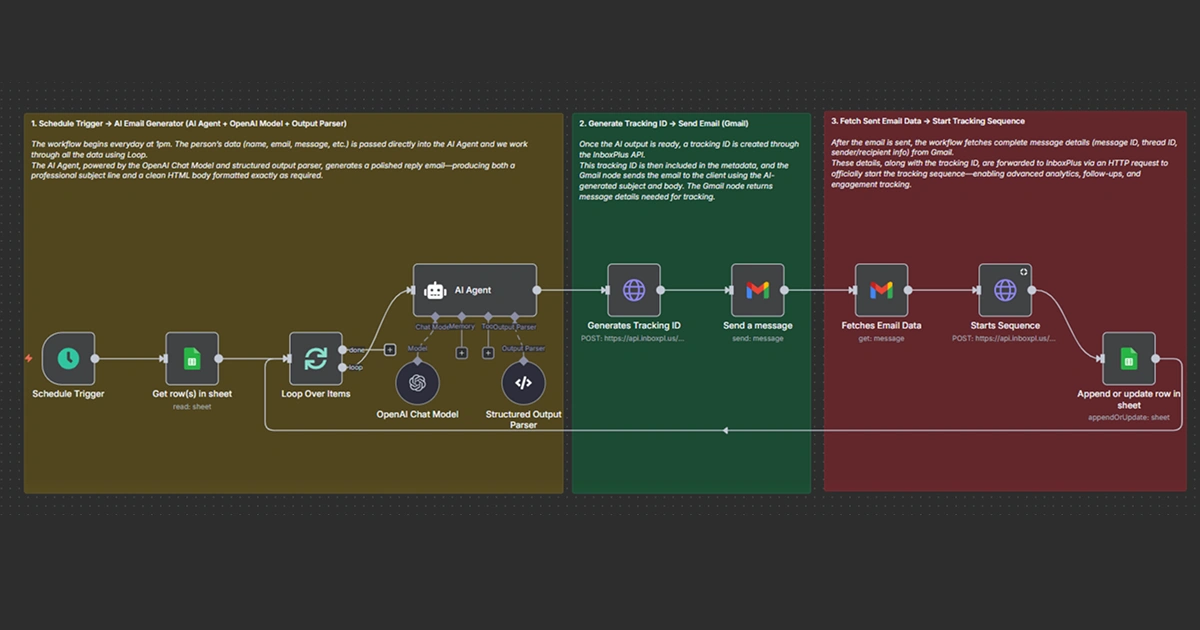
Workflow Description
Too many outbound efforts fail not for lack of leads, but for lack of consistent follow-up. This workflow solves that exact problem: whenever you add a prospect to a Google Sheet, an automated process generates a personalized message, sends it, sequences follow-ups if needed, and updates your sheet when prospects reply — all without manual intervention.
👉 Use This Workflow
Here’s How This Agent Works
At a high level, the workflow acts as an always-on outbound assistant:
- You add a prospect to your Google Sheet manually or through your outbound lists.
- GPT generates a personalized outreach email based on the prospect’s details.
- InboxPlus sends the email and runs automated follow-ups if the prospect doesn’t reply.
- When someone responds, the system updates the row in your sheet automatically so you always know who engaged.
This turns one-off outreach into a predictable, repeatable system — making your outbound process reliable and scalable.
🛠 Step-by-Step Breakdown (Node View)
Note: Node names are descriptive — map them to your tooling (n8n nodes, Zapier steps, or other automation platform) when building.
STEP 1 — Trigger & Prepare Prospect Data
Google Sheets: New Row Trigger
- Detects newly added prospects in the outbound list.
Validate Lead Data
- Ensures essential fields like name, email, and company are available.
Normalize Data
- Prepares clean inputs for GPT.
STEP 2 — Create Personalized Outreach Email Using GPT
GPT Email Writer
- Generates a warm, relevant, personalized outbound email based on the prospect’s details.
Content Review (Optional)
- Ensures the email is readable and aligned with your outbound tone.
STEP 3 — Automated Sending & Follow-Up via InboxPlus
InboxPlus: Send Initial Email
- Sends the GPT-generated email immediately to the prospect.
InboxPlus: Automated Follow-Up Sequence
- If there’s no reply, InboxPlus sends timely, friendly follow-ups over the next few days — without feeling robotic or spammy.
InboxPlus: Stop Sequence Automatically on Reply
- Replies pause all follow-ups instantly.
InboxPlus handles delivery, timing, tracking, and sequencing — fully automated.
STEP 4 — Update & Log
Monitor Replies
- Watches for inbound responses to detect engagement.
Update Google Sheet
- Writes the latest interaction, reply timestamp, and a short note into the prospect’s row.
Team Notification (Optional)
- Sends a summary to Slack or email when a prospect replies or is identified as high priority.
Archive / Audit Log
- Optionally append a history row or sheet for compliance and reporting.
💡 Why Is This Powerful?
- Consistent follow-up at scale: Every prospect receives timely outreach and follow-ups — eliminating human forgetfulness.
- Personalization without manual effort: AI crafts messages that feel tailored, increasing open and reply rates.
- Faster response, higher conversion: Instant outreach nudges prospects while interest is hot.
- Clean, current pipeline: Automatic updates keep your sheet or CRM accurate without manual logging.
- Low-cost SDR alternative: Get the impact of a dedicated outreach resource without hiring additional staff.